
Provider: |
Przemyslaw Rumik |
Maintainer: |
przemelek |
Rating: |
(36 votes)
|
Application: |
Calc, Writer, Impress |
Tags: |
impress, extension, writer, extension, google docs, extension, calc, extension, zoho, extension, webdav, extension |
Screenshots: |
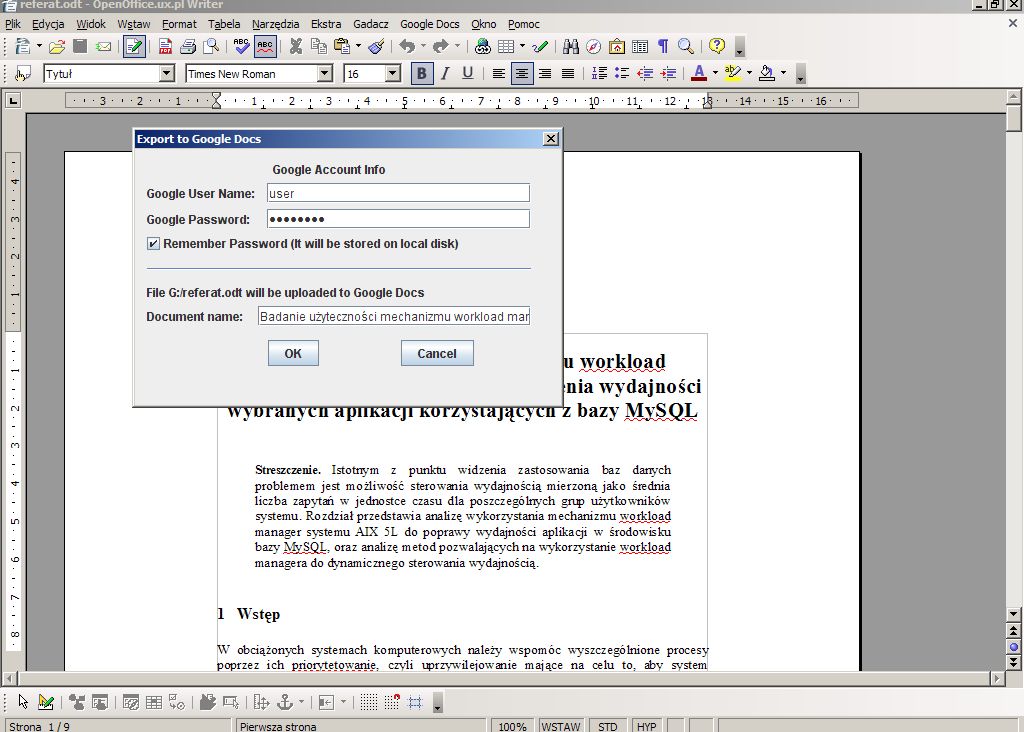
http://www.przemelek.pl/ooo2gd.jpg |
Source code: |
http://ooo2gd.googlecode.com/svn/ |
Post date: |
Monday, 3 September, 2007 - 06:40 |
Statistics |
Week: Not tracked - Month: Not tracked - Year: Not tracked - Timeline |

Export, Update and Import your documents to and from Google Docs, Zoho and WebDAV servers.
With OOo2GD you may export to Google Docs, Zoho and WebDAV servers:
* Documents: ODT, SXW, DOC, RTF without modification, other known to OO.org after conversion to ODT
* Spreadsheets: ODS, XLS, CSV without modification, other known to OO.org after conversion to ODS
* Presentations: PPT, PPS without modification, other known to OO.org after conversion to PPT
For Google Docs you may export, update and import all your documents, spreadsheets and presentations, for Zoho you may export documents, spreadsheets and presentations, and import documents and spreadsheets, to WebDAV you may export what you are able to open in OO.org :-)
Needs Java 5+ to work.
| Version | Operating system | Compatibility | Release date | ||
|---|---|---|---|---|---|
| 3.0.1 | Linux, Windows | -- | 28/03/2014 - 09:19 | More information | Download |
| 3.0.0 | System Independent | 3.4 | 05/06/2011 - 13:45 | More information | Download |
| 2.4.0 | System Independent | 3.4 | 11/05/2011 - 15:45 | More information | Download |
| 2.3.1 | System Independent | 3.4 | 25/11/2010 - 12:30 | More information | Download |
| 2.3.0 | System Independent | 3.4 | 02/11/2010 - 20:01 | More information | Download |
| 2.2.0 | System Independent | 3.4 | 04/04/2010 - 17:11 | More information | Download |
| 2.1.2 | System Independent | 3.4 | 26/02/2010 - 15:56 | More information | Download |
| 2.1.1 | System Independent | 3.4 | 17/02/2010 - 20:13 | More information | Download |
| 2.1.0 | System Independent | 3.4 | 03/01/2010 - 12:37 | More information | Download |
| 2.0.0 | System Independent | 3.4 | 23/12/2009 - 18:35 | More information | Download |
| 1.9.1 | System Independent | 3.4 | 16/12/2009 - 14:59 | More information | Download |
| 1.9.0 | System Independent | 3.4 | 12/11/2009 - 13:58 | More information | Download |
| 1.8.2 | System Independent | 3.4 | 25/10/2009 - 14:35 | More information | Download |
| 1.8.1 | System Independent | 3.4 | 05/10/2009 - 17:18 | More information | Download |
| 1.8.0 | System Independent | 3.4 | 03/10/2009 - 10:44 | More information | Download |
| 1.7.2 | System Independent | 3.4 | 14/08/2009 - 09:42 | More information | Download |
Comments
1. Open OpenOffice
2. Click on Tools from within whatever module you are using (Writer, calc, etc.)
3. Click on Options
4. From the tree on the left, there is a Java option. Click on it.
5. Highlight the current version of Java, make sure the bubble to the left is filled in, and click on OK at the bottom.
It worked for me. Win 7 x64
Is there an alternative plugin that actually works and does not fail to install after I download it?
I'm running Windows 8 x64 on a Dell Inspiron 1520.
Windows 7 Home Premium 64 bit
OO3.4
Java 6
Extension manager: (com.sun.star.lang.DisposedException){{{ Message = "Binary URP bridge disposed during call", Context = (com.sun.star.uno.XInterface) @9e040d0 }}}
and
Extension manager: (com.sun.star.lang.DisposedException){{{ Message = "Binary URP bridge disposed during call", Context = (com.sun.star.uno.XInterface) @9148260 }}}
Completely useless.
Also crashed in the same way on 3.3
Install failed - error message =
"Could not create java implementation loader"
System = Mac Os 10.7.4
Computer = Macbook Pro
Java installed =
Java SE 6 64-bit version 1.60_33-b03-424
Java SE 6 32-bit version 1.60_33-b03-424
Very disappointing, I very much need this functionality.
After installing the extension, I go to File > Export to Google Docs.. > Configure, and the OO crashes. I tried to just click Export to Google Docs on the toolbar and nothing happens. Using Mac OSX Lion.
OS X 10.7.2
OO.org 3.3.0
Toolbar does nothing, and configuration crashes OO.
on windows 7 x64 Oo 3.3 - Could not create java implementation loader
I have windows 7 (32 bit) and OOo 3.3. Upon opening the extension manager after the download I get the message 'Could not create Java implementation loader' , and the extension will not enable.
On Windows 7 (32 bit) OpenOffice 3.3 when installing this extension Windows tells me uno.exe stopped working end then I get the following error:
(com.sun.lang.disposed execution) {{{ message= ??? Disposed\X000a(tip=5588) unexpected connector loss context= com.sun.uno.xinterface) @0 }}}
I can install and activate this extension to LibreOffice 3.2.2, but when I try to upload the document I get an "invalid credentials" error.
I searched on the net and I found that this error occurs if your password includes the character "@"
Even now that I changed my password to : wordnumber without any other strange characters, I still get the same error.
---> SOLVED : I did give the wrong credentials :)
I am running the latest version of Mac OS X 10.6.7. I have the latest version of Java and Openoffice and I just downloaded your plugin and installed it. When I try to configure it to sync with Google Openoffice promptly crashes every time.
Mac OSX 10.6.6
OO 3.3.0
OOO2GD 2.3.1
I can see the Google Docs & Zoho menu on the File menu, but the options are grayed out and unselectable, so I cannot configure. From the pages here, it looks like this should be relatively straight forward to set up, and there are no other steps listed to connect OO to Google Docs.
Have I missed something?
If you want to localize OOo2GD to new language, you may prepare new localization file and try to place it in your user directory (on Windows XP it is c:\Documents and Settings\), after this OOo2GD should can see new language. This language may be visible as country code (exactly as part of file name, so if you will call your localization file ooo2gd_toster.properties it will be probably visible as toster).
You may also (And this will be the best idea :-)) to send me this file with info who you are, and which language it is, and I will try to add your translation :-) (to contact with me go to http://www.przemelek.pl/kontakt)
Trying to add a new WebDAV server results with nothing. So, there's no possibility to use this way of syncing...
Hi guys. Please, help me to find info how to localise this extension to Ukrainian? I tried to create a new file ooo2gd_uk.properties but that didn't help me. Thanks.
Every time I try to submit anything to Google Docs with this extension, I receive the error "POST method does not support concurrency" and then the process aborts. This is made even more frustrating my the fact that it used to work perfectly.
I'm running OOo 3.2.1 in Windows 7 Home Premium. I previously used the extension in older versions of OOo in both Win2k and WinXP64.
It suddenly started working again but I have no idea why.
Installed OpenOffice 3.3 RC1 and this extension doesn't seem to be working anymore.
Other extensions work.
Have heard others with same problem.
Thanks anyway for a very useful extension.
/W
I have had this extension for some time now and earlier this week it stopped working - the options no longer showed up in the File menu. I reloaded the extension, no good. I un-installed and re-installed OpenOffice and the extension,no good. I un-installed OO and removed the .openoffice.org directory from my $HOME, re-installed all, no good.
So now I am stuck.
I have:
OpenOffice 3.2.0
Java6 Open JDK
- java version "1.6.0_18"
- OpenJDK Runtime Environment (IcedTea6 1.8.1) (6b18-1.8.1-0ubuntu1)
- OpenJDK Server VM (build 16.0-b13, mixed mode)
Openoffice2googledocs gdocs_2.2.0
Any ideas?
Thanks,
Dave
Doesn't work on Mac OS Leopard. Any idea?
Thanks
works like a charm. The toolbar is just perfect. I can access my google docs very easily now and edit them either in openoffice or in my web browser.
Ubuntu 10.04
Firefox 3.6.10
OpenOffice 3.2.0
Why isn't this working with Zoho??? I try to Upload to Zoho, it says the upload completes, but my zoho account doesn't have the document. I have tried multiple times, my login info is correct. I'm boycotting google due to their abandonment of their previous open internet philosophy (I encourage others to do the same as well!), and zoho looks wonderful but the only problem is this plugin is not working.
Doesn't work on MacBook Air, MAC OS 10.6.4, Open Office 3.2.1
No any reaction when I press any extension's button.
Thanks,
YK
7/4/2010
Hi,
Happy user in Windows and Ubuntu, so thanks for the extension!
However, just got a new MacBook Pro w/ OS 10.6.3, Java SE 6, 64-bit. Installed NeoOffice 3.1.1 Patch 1 and got your extension today, but so far I can't use it because all of the text within your extension's dialog boxes is spaced apart so far that the boxes extend well past the edge of my monitor, and I can't really read anything.
Here's a screenshot of what I see when I select to upload to Google Docs:
http://picasaweb.google.com/lh/photo/bM_5C4EZnvqtaPZQc-F-aA?feat=directlink
Thanks,
-PF
7/10/2010:
I updated to Java SE 6 to 1.6.0_20. Still getting same behavior.
Is there anyway I can use the google doc addins within a Macro? This would be huge for me. The problem with sycing to docs is it changes the google id, I need to open the existing doc update it and save it automatically. Any help is appreciated. Thankjs
After a long search, I managed to install this extesión without installing the "official OpenOffice.org."
Install the packages related to "Java" and "JRE" in the Ubuntu Software Center. "OpenDJK Java 6", "Base of all Java", "Standard Java or Java compatible runtime", "OpenDK Java runtime (architecture independent libraries) and try.
The extension works perfect.
(Inglish from Google Traslator :)
Trying to update a document created with the latest version of the document editor in Google Docs (enabled in Settings->Document Settings->Editing->New Version of Google Documents) results in a "Problem: Could not convert document".
It would be nice if OOo2GD could support the new Google Docs editor. Uploads are a lot truer to the original document.
Export is working fine for me, but the import screen is changing to useless during loading in. I have Ubuntu Linux Lucid (10.4) Netbook edition:
Screenshot:
http://picasaweb.google.hu/lh/photo/WqmRc7Ug0GxBpl097hiskZgtzsYvDIYNu1eiNlQaWis?feat=directlink
Don't know why, but OO.org shipped with Ubuntu is "strange", please look at issue 5) on http://code.google.com/p/ooo2gd/wiki/KnownIssues
Most important will be using apt-get install openoffice.org, this should resolve your problem.
Good morning!
I'm using OpenOffice 3.1.1, running in Ubuntu 9.10 - Karmic Koala. My computer is an AMD Turion 64bits and run Java 1.6.0_15 and OpenOffice reconized it correctly.
When I'll to install this extention it's stopped and display this message:
https://docs.google.com/leaf?id=0B4BToJsrwL2KOWFlODczNGItYWUyMC00M2I3LWJlZjItMGEwYTQ0ZWVjOTkw&hl=pt_BR
Please, help me about this.
Regards.
Tio Xavier, from São Paulo, Brasil.
Im using 32 bit Ubuntu 9.10 2.6.31-20-generic with OO 3.1.1 OOO310m19 (Build:9420)
The installation fails with the error dialog
(com.sun.star.registry.CannotRegisterImplementationException) { { Message = "", Context = (com.sun.star.uno.Xinterface) @0 } }
OK
Under Ubuntu you need to install OpenOffic.org in proper way by using:
apt-get install openoffice.org
After this instalation of OpenOffice.org2GoogleDocs should work without any problem
Thank you for your help your solution fixed my problem with Ubuntu 10.04.
When I try to export to Google Docs, OpenOffice crashes.
I'm using Mac OS X Version 10.6.2
Any help appreciated
Mike Stevens
As far as I know this isn't problem with extension but with OO.org on MacOS, here more details http://www.openoffice.org/issues/show_bug.cgi?id=92926. Strange is that from this what I know problem is visible only on OS X 10.6.2
Something for the next release if it could handle sub-folders on Zoho Docs. At the moment it only appears to look in the main folder of your Zoho account when downloading/uploading.
Hello,
Google Documents now can upload documents without conversion, e.g., complicated spreadsheets in Excel format that do not convert - see http://docs.google.com/support/bin/answer.py?answer=50092. However, for me this extension's (v.2.1.0) "Get list" function only lists the documents that are in GoogleDoc format, others are "invisible". Would it be possible to also list and open the unconverted documents? I am running Debian GNU/Linux "testing" and OO.org 3.1.1.
Thanks.
When I try to upload a .doc file, I get this error after a while: "Could not convert format". Anyone knows why??
Suddenly, when I try to upload (a file I have uploaded many times previousls), the extension hangs and gives the error:
Cannot convert document.
Why does this happen? How can I fist it.
I didn't think this would work with Google Apps for Domains to, but it did. It would be nice if you could choose where to store the login information though. Then you could store it in an encrypted folder.
I'm using OOo2GD with my 2 accounts in Google Apps for domains in two different domains and it works.
I'm using it with Standard Edition of Google Apps and probably with premium.
Hi,
Ubuntu 9.10, OOO 3.1.1 (OOO310m19, build 9420), java 1.6.0.16.
Menus did not appear when first installing. Remembered an old suggestion and installed twice, both times restarted OOO. Now menus appeared, but when trying to up- or download String index out of range: -1 message is given in alert box, together with another small message somewhere right side of screen Please wait... The normal alert message goes away when clicking but the small Please wait (it is also on a task bar with a Java logo) can be closed only when closing it from taskbar.
Configuration dialog from menu opens normally.
Best regards
Kristjan Adojjaan
I log into Zoho using the Yahoo account option.
Is there a way to get this to work with this extension?
Thanks
Haven't used for a while. Now tried again: 1.4.2 gave "problem: null" while trying to upload and empty error while trying to get list from gDocs.
Therefore I tried to install 1.7.2. Installation went without errors but menu and toolbar did not appear. Tried to install twice, remove and install, disable and enable, restart OO, etc. Nothing helped. I use OO 3.1.1 (OOO310m19, build 9420). Xubuntu 9.04.
I tried to install earlier versions, too, but 170 and 171 does not appear either. 160 appears in menu and toolbar, but the errors are the same as with 1.4.2 I mentioned above.
Dear Przemyslaw,
I reinstalled google doc extension and it is working seamlessly.
Thanks.
Dr. Ashok Koparday
PS
I do not know if this is the right place, I wish to know where I can find extension that does
'summary' the way it is done Microsoft Office.
Dear Przemyslaw,
An extremely satisfactory extension after updating to Open Office 3.1
fails in uploading. The message is:
message
Problem: no object DCH for MIME type application/atom+xml
Kindly let me know how I rectify this.
Regards,
Dr. Ashok Koparday
Hi,
when I install extension, I view this error messages:
(com......CannotRegisterImplementationException){ { Message = '', Context = (com.sun.star.uno.XInterface) @0 } }
I use Java stantard (not open), release1.6.0_13
Thanks
Luigi.
http://code.google.com/p/ooo2gd/wiki/KnownIssues and issue #6
"Install the package which named "openoffice.org" from the repo, then OOo2gd will be installed properly. "
I installed Openoffice 3.0.1 on my windows xp and am using Java 6 update 13. I can download files from google docs, but always get "bad request" while attempting to upload any files. Any idea what I did wrong? Here is the error log:
com.google.gdata.util.InvalidEntryException: Bad Request
Every time I try to install this extension I get a load of error codes of which I think "Unsupported class version error" is the most meaningful.
Can anybody help me?
TheDP