
Maintainer: |
cl |
Rating: |
(9 votes)
|
Application: |
Impress, Draw |
Tags: |
impress, extension, export, extension, png, extension, draw, extension, graphics, extension, bitmap, extension, pixel, extension, jpg, extension, gif, extension |
Screenshots: |
http://lippka.com/OOo/extensions/exportoptions/screenshot.png |
Post date: |
Thursday, 8 January, 2009 - 10:14 |
Statistics |
Week: Not tracked - Month: Not tracked - Year: Not tracked - Timeline |

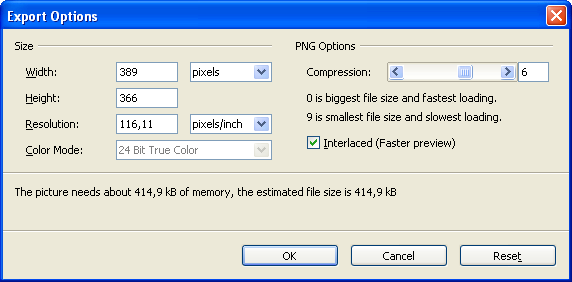
This extension adds a new options dialog when you export slides or selections from OpenOffice.org Impress or OpenOffice.org Draw to either PNG, JPG or GIF bitmap files. It allows you to change the pixel size and some other format specific settings like the image compression factor for JPG.
Just install the extension, open up an Impress or Draw document and go to File->Export and select either PNG, JPG or GIF. After selecting a location and a file name press save. The new dialog should pop up.
This extension requires Java.
Update: Sven Jacobi from Oracle did a native implementation of this dialog for OOo. It will be available for OOo 3.4. So starting from OOo 3.4 this extension will no longer be needed.
| Version | Operating system | Compatibility | Release date | ||
|---|---|---|---|---|---|
| 0.0.2 | System Independent | 2.x, 3.0, 3.1, 3.2, 3.3, 3.4 | 08/01/2009 - 10:19 | More information | Download |
Comments
First of all: great extension, a must have!
(As mikeuk wrote about one year ago ...)
Is it possible to fix the transparency feature? OO handles transparent colors correctly for GIF exports. This extension also offers the check box "Save transparency" during GIF export, but it doesn't effect anything. If checked or not, the resulting GIF image files are identical (diff checked) and with a white background.
Works great!
I'm currently working on a new update which will contain tiff support and also a Czech translation provided by Petr Valach.
If you have trouble installing this extension please make sure that you have Java installed and also using an official build from OpenOffice.org. Many linux distros build their own brand of OpenOffice which may not be compatible with this extension. Using a version directly from OpenOffice.org is always preferred.
Hi I made translation to Czech, how can I send you?
Under fresh installation of OOo 3.2 with your plugin I can't recieve updates, error is
"http://lippka.com/OOo/extensions/exportoptions/GraphicExportDialog.xml does not exist"
how can I fix it?
Regards,
Sergey
Problem is I think over the web site having gone missing.
To get rid of the error message, I found the web site is specified in the extension's description.xml file, and commented out the relevant section - on my system it is in C:\Documents and Settings\...\Application Data\OpenOffice.org\3\user\uno_packages\cache\uno_packages\58.tmp_\EnhancedGraphicExportDialogs.oxt .
You will then have to check manually for updates.
OOO310m19 (Build 9420)
openoffice-core 1:3.1.1-5ubuntu1
Error message 1:
(com.sun.star.registry.CannotRegisterImplementationException)
{ { Message = "", Context = (com.sun.star.uno.XInterface) @0} }
Error Message 2:
/home/..../.openoffice.org/3/user/uno_package/cache/uno_package/1nkd2X_/EnhancedGraphicsExportDialogs.oxt/EnhandedEcportDialogs.xcs does not exist.
hope that helps....
Thx
howil
ps.: thanks for this great export extension... i love it
Cheers to the author for producing this Extension. I've been using it successfully through Ubuntu 8.10 and 9.04.
I recently did a clean operating system install, upgrading to ubuntu 9.10. Running OO 3.1.1 (OOO310m19(Build:9420) - openoffice.org-core 1:3.1.1-5ubuntu1).
I get three error boxes when I try to install the extension:
Message 1:
(com.sun.star.registry.CannotRegisterImplementationException){{Message = "",Context=(com.sun.star.uno.XInterface) @0 }}
Message 2:
Add Extension(s):
/home/username/.openoffice.org/3/user/uno_packages/cache/uno_packages/RmZol0__/EnhancedGraphicExportDialogs.oxt/config_impress.xcs does not exist
Message 3:
Add Extension(s):
/home/username/.openoffice.org/3/user/uno_packages/cache/uno_packages/RmZol0_/EnhancedGraphicExportDialogs.oxt/config_impress.xcs does not exist
Message 4:
Add Extension(s):
/home/username/.openoffice.org/3/user/uno_packages/cache/uno_packages/RmZol0_/EnhancedGraphicExportDialogs.oxt/config_impress.xcs does not exist
If there's anything I can do to help with testing, let me know. I've got a bit of coding experience, but none in OO extensions.
On my system (Kubuntu Karmic 9.10 w/OOffice 3.1), I can't install this extension - open office simply crashes. This is the case on all my Kubuntu machines and also happened with 3.0 on Jaunty. Anybody have a solution?
Thanks!
The end of the error messages from the terminal when it crashes is:
QPixmap: It is not safe to use pixmaps outside the GUI thread
QPixmap: It is not safe to use pixmaps outside the GUI thread
QPixmap: It is not safe to use pixmaps outside the GUI thread
QPainter::begin: Cannot paint on a null pixmap
QPainter::save: Painter not active
QPainter::setRenderHint: Painter must be active to set rendering hints
QPainter::setPen: Painter not active
QPainter::setBrush: Painter not active
QPainter::restore: Unbalanced save/restore
QPainter::fontMetrics: Painter not active
QPainter::pen: Painter not active
QPainter::setPen: Painter not active
QPainter::setPen: Painter not active
X-Error: BadDrawable (invalid Pixmap or Window parameter)
Major opcode: 62 (X_CopyArea)
Resource ID: 0x0
Serial No: 17509 (17509)
These errors are reported asynchronously,
set environment variable SAL_SYNCHRONIZE to 1 to help debugging
Is it possible to add the ability to export with a transparent background and alpha transparency?
Cl, thank you for the development of this needed export functionality. It is very much appreciated.
In case you (or someone else) happen to do further work on this functionality, it would be great if it could be enhanced with the following features:
a) exporting to TIFF
b) setting the colour depth (i.e. number of bits used for colour coding) when exporting to PNG and to TIFF
I use OOo Draw and I need to output the drawings to TIFF in black & white (1-bit colour depth). With the version 0.0.2-rc-1 of the plug-in, the drawing can be exported to PNG with 24-bits colour depth, unfortunately not to TIFF 1-bit colour depth. I have to load the exported PNG file into GIMP to convert it to the wanted TIFF 1-bit colour depth format. It would be great if the plug-in could output the OOo drawings directly to the desired TIFF format with the desired colour depth.
This is a great extension! I missed this feature since I use OpenOffice.org.