
Provider: |
 Sun Microsystems Inc. Sun Microsystems Inc. |
Maintainer: |
mh |
Rating: |
(11 votes)
|
Application: |
Writer |
Tags: |
blogging, extension, Sun, extension, web2.0, extension |
Screenshots: |
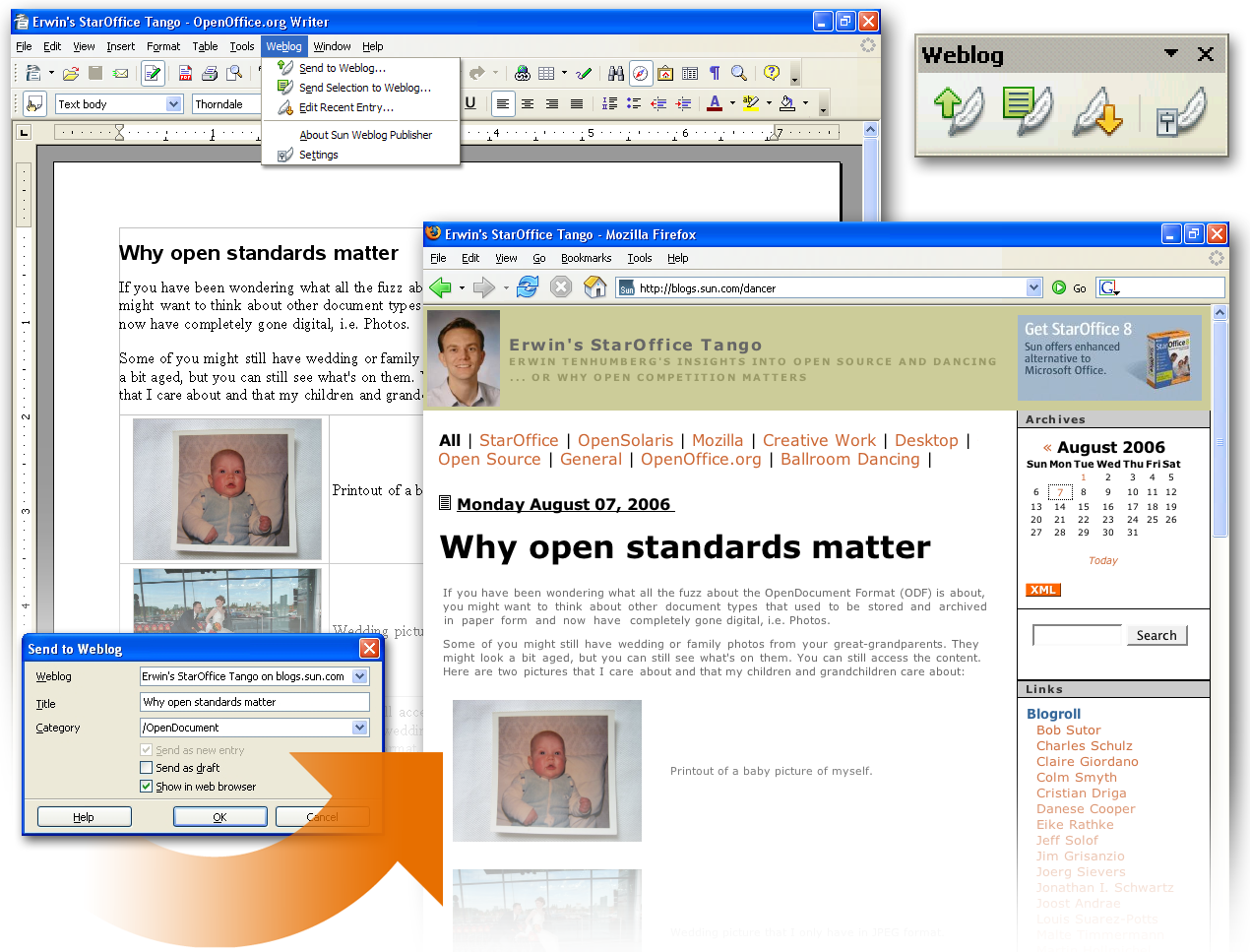
http://specs.openoffice.org/writer/extensions/swpScreenshot.png |
Post date: |
Thursday, 26 April, 2007 - 06:03 |
Statistics |
Week: Not tracked - Month: Not tracked - Year: Not tracked - Timeline |

The Sun Weblog Publisher allows you to quickly create, edit and publish weblog entries on many popular Blog servers. It is easy to use so that any user can start blogging right away! Use the advanced word processing features of the Writer to create blogs with tables, bullets, hyperlinks, graphics, and spellchecking via the office suite's spellchecking technology
Supports a number of Blog platforms, including Roller, WordPress, Generic ATOM and Generic MetaWeblog
Requires StarOffice 8 (Update 4 or higher) or OpenOffice.org (2.0.4 or higher).
| Version | Operating system | Compatibility | Release date | ||
|---|---|---|---|---|---|
| 1.1.1 | System Independent | 2.x, 3.0, 3.1, 3.2, 3.3, 3.4 | 18/12/2009 - 05:04 | More information | Download |
| 1.1.0 | System Independent | 2.x, 3.0, 3.1, 3.2, 3.3, 3.4 | 22/07/2008 - 09:48 | More information | Download |
| 1.0.2 | Windows, Linux | -- | 26/04/2007 - 06:30 | More information | Download |
Comments
I can't publish post in my Network-Wordpress because it can't connect.
it need update so soon
Since saturday the Publisher doesn't work any more with actual OO-Version and wordpress.com
Tested on Windows 7 and Windows XP
Any idea ?
I recall once in an earlier version of Ooo it worked great now I can't get it to connect to anything.
Here is a conversation I had with Martins, see this link http://www.google.com/support/forum/p/blogger/thread?fid=11e8972d5281f5200004af2a5fc7eec2&hl=en
Short description of problem: The images i send from LibreOffice via 'Sun weblog publisher', they are not uploaded on Blogger.
I do this instead. I upload the text, without images. Then i login to 'Blogger', inside 'Blogger' I upload the pictures.
Who is the problem-maker, is it Sun or Google?
Best regards Peter.
HI again. I forgot to mention, yhat I use windows xp servicepack 3.
I also tried using 'Sun Weblog Publisher' on Ubuntu (LibreOffice). Here the plugin failed miserable.
It would really be cool, if I could upload my document, and it would appear looking 'exactly' the same on my blog (text, formating and images).
I hope someone/'Sun' develops a neat solution in near future.
Maybe they will develop this feature for spreadsheet and draw to.
But I can live/do with, editing the pictures direct from blogger, it is ok.
I wondered, where are the uploaded pictures stored? Are they stored in my picasa web album?
I checked with the Picasa TCs, and this is the answer I got: "It's possible that Sun web Publisher cannot upload the photos to Picasaweb into it's own album."
I suppose the next step would be to ask the people at Sun Weblog Publisher for their position on this. Perhaps the next version will support Pixasa?
What the Sun Weblog Publisher proposes to do matches very nicely with what I would like to do.
However, it doesn't work well enough to mess with. A couple of problems that I encountered right out of the box are -
1. On input from the blog site it would only retrieve that portion of the post that precedes the "more" tag.
2. On output it consistently produces an error dialog even though it does seem to add something back onto the blog site.
This is pretty basic stuff.
[quote]The Sun Weblog Publisher allows you to quickly create, edit and publish weblog entries on many popular Blog servers. It is easy to use so that any user can start blogging right away![/quote]
I couldn't use this add-on a year ago and it's still throwing up errors
'an error occurred when posting to the weblog server. Check the server configuration and access permissions'
It's a wordpress blog I use so my options seem to be to enter
Type = wordpress or wordpress.com
(it doesn't matter which I use)
then I am invited by the configuration window in the extension manager to enter the name of the blog
- this can't be all that hard, it's my blog after all
then there are the user-name and password entries to add
- I use these all the time when I create my entries in the blog
so close and I assumed that everything was hunky-dory, I assumed incorrectly, haven't been able to post a single entry through OO-Writer
I have tried all manner of 'name' for the blog, either just the name, the URL, -- EVERYTHING
I don't know that I shall be getting a lot of help from here since SUN took over there seems to be plenty of questions being asked here but not much in the way of follow-up
This works great from OOo 3.3 publishing to a WP 3.1 install. One note: In the old days, smart quotes used to get goofed up when publishing from here, but I see that's all fixed now. I suspect, though, that may have been an improvement on the part of Wordpress, but that's just a guess. Thanks for making this available!
edit: I should also mention I'm running it from a Windows 7 machine. I haven't tried it from Linux/ubuntu yet.
Does not work in the latest version of OO.o provided by Ubuntu 10.4, it spits out so many error messages that I can't be bothered to interpret them.
This extension dies horribly when attempting to install it on 3.2.0 which shipped with KUbuntu 10.04 LTS. I even installed the actual Sun Java and it made no difference.
I cannot get the file to download with a recognizable extension on it. It downloads with a filename of "3431" with no ext.
My Openoffice is the portable version, maybe that is a problem?
Im on Ubuntu Karmic, Ooo 3.1.1 and the last release of Sun Weblog Publisher. I can login to blogspot(i have some blogs there) through Sun Weblog Publisher but on one blog i can't see any post. In others i see all posts i have there.
Moreover when i try to post to any blog i obtain an error message: "An error occurred when posting to the weblog server. Check the server configuration and access permissions."
What all that mean? In blogspot normally on Firefox username/password is enough to connect and work on posts
Any workaround ? TIA
I'm using Open Office 3.2 on a opensuse 11.0.
Writing a post is wonderful. If I tock pictures in the text from my hd they will not uploaded to my blog at blogger.com.
I try this expension with Linux and Windows XP. It doesn't work.
By posting I use the option "entwurf" but the text is directly online.
But not always only sometimes.
Using:
OpenOffice: 3.2.0
( OOO320m12 bld 9483)
sun Weblog Publisher 1.1.0 on Wordpress.com
Win XP sp2
I just installed SWP and tried it - got the popup message -
"An error occurred when posting to the weblog server. Check the server configuration and access permissions."
After trying couple of things, and trying to publish the post as draft, not draft, etc - looked at my blog, and all attempts had been posted, regardless of the message.
Any hints on eliminating that invalid error message?
TIA
Dave Willis
Hello,
I use SWP since OO 2.x. Can't remember the version installed, when this message appeared for the first time, but installing OO 3.x didn't change anything. I tried out different settings in my Wordpress-Installation, but I didn't succeed in removing the message. All attempts are still posted, but the error-message remains.
Regards
Herbert A. Eberth
My problem is that when I download the Publisher and click open I am informed that I already have it in my Open Office extensions. I cant' find where Oo has stored it, in what file, where! So I download it again and say yes to replace the one I can't find. Is advice available to tell me where I go from here? The extension video makes it look so simple but when I follow it there is no advice as to what I do after it tells me to click add. Then what! A blank file with the word 'extension' on it appears and nothing else. I'm missing something. Stymied!
Maybe I should blog this.
"Can not activate the factory for com.star.help.HelpIndexer because java.lang.NoClassDefFoundError:org/apache/lucene/analysis/cjk/CJKAnalyzer"
I think basically it ,means this extension won't install
But you'd have to be an Oracle programmer to understand it
This sounded like a good idea, but I'll never know
Any chance of getting this to work in 3.1? All I'm getting is a grayed-out icon in the toolbar, no way to connect via internet options or even any "Send to Weblog" option in the file menu. Frustrating!
It only seems to be on Right Click Context Menu in Writer.
it ALWAYS gives an Error.
Make sure you added your Blog in Extensions Manager.
I could only upload images with 777 on the current Month's upload directory, which is not great so I added .htacess in uploads parent directory:
<Files ^(*.jpeg|*.jpg|*.png|*.gif)>

   order deny,allow

   deny from all

</Files>

Options -ExecCGI

AddHandler cgi-script .php .pl .py .jsp .asp .htm .html .shtml .sh .cgi

ErrorDocument 403 {your website error page}
The last line is optional to fake a 404 on Wordpress, just have a path to non-existent doc
i.e. http://www.techtir.ie/not-found/
Assuming you have no not-found directory
put an index.htm or index.hml in directory to test your .htaccess
Alternate to -ExecCGI:
AddType text/plain .pl

AddType text/plain .cgi

AddType text/plain .php

AddType text/plain .jsp

AddType text/plain .py

AddType text/plain .asp

AddType text/plain .sh

AddType text/plain .idc

AddType text/plain .htm

AddType text/plain .html

AddType text/plain .htx

AddType text/plain .shtml
Anyone know what happens after 60 days?
Ok, try this: install it, then restart OOo. Disable the extension from the extensions manager, then restart OOo again. Enable the extension, then restart OOo one last time. Not sure why, but this worked for me this time. Extension works as promised now. One more question: The extension page says to "try it free for 60 days." Does that mean I will end up having to pay for this, or does that only apply to StarOffice? Not trying to be cheap, but that just seems to go against open source thinking.
Even this workaround doesnot work on my ubuntu openoffice.org installation. When Using plain vanilla OpenOffice.org build from download.openoffice.org the installation of the publisher goes smoothly, even with no restart at all. reported this into launchpad https://bugs.launchpad.net/ubuntu/+source/openoffice.org/+bug/415772
The Weblog menu doesn't show in OO.o 3.1.0 on WinXP. The plugin can manage blog, and even open existing blog entries, it can even open the about window - but the menu is missing.
This doesn't work in OOo 3.1.0 in Linux/ubuntu, either. I'm not even able to find where to connect it to a blog.
This extension would be perfect if it had LiveJournal support, or even Atom support that would work with LJ's implementation of Atom. If only the source code were available, I might even try my hand at hacking it in.
Just a reminder for those who have upgraded to Wordpress 2.7, you will need to go to site admin Settings - Writing - Remote Publishing - enable XML-RPC checkbox. Otherwise the extension will not work.
The description for this extension that is shown in the Extension Manager seems not to describe the weblog publisher.
Hello, all,
I am getting the information "can´t connect" when entering:
Typ: WordPress
url: test10.web2.0campus.net (which is the url of the Blog)
and a username & pw of the Blog (which for sure is right)
Using: OOo 3.0.0 and WordPress 2.6.3
Same problem when entering url: localhost/testloc10 (which is a local install of WP)
Any help ?
Thanks, Michael
I purchased SWP when it first came out in v. 1.0, but found it not satisfactory because I couldn't publish my posts in my Wordpress.com blog directly from OOo Writer but had to manually edit the formatting; so I kept it but never used anymore, until v. 1.1.0 came out a couple of weeks ago.
So I downloaded the new release, uninstalled the old one, installed the new one and... got stuck with it, because I got the message that "can't connect with the server" (words are other, in Italian, but that's the meaning), although there are no proxies, no firewall settings, nothing wrog at all... except SWP!
This happens both in OOo 2.4.1 and OOo 3.0 Beta 2.
Any suggestions?
Cheers,
Emanuele Forner, Italy
The problem was not with SWP; the problem was me... or, better, the fact I did not understand how to exactly set the hostname parameter; in fact, it was easier than I thought: in Wordpress.com, instead of typing the complete URL I had only to type the blog name; as for Wordpress, I had only to follow the instructions in the dialog window (the complete URL path to a specific file).
So, the bad luck was not mine... but SWP's!
Emanuele Forner, Italy
I just used SWP to publish a post on my Wordpress.com blog: it all went fine (while SWP 1.0 did not work so well...).
I thought I had to say it, after my first post... :-(
Emanuele Forner, Italy
I'm getting an error that says "Could not create java implementation loader." Cannot find answer. Help!
I bought it because in the documentation says that it supports blogger.com, but when I tried it I got an error message: "cannot connect to www.blogger.com", so if you are planning to buy it to use for that service, don't.
Gabriel Castellanos
When I try to install the extension, I get a popup that says
Adding Extension(s):
/home/dkeats/.openoffice.org2/user/uno_packages/cache/uno_packages/ufhxmj_/sun-weblogpublisher.oxt does not exist.
[OK]
I have tried on three separate computers and get the same message. Ubuntu 7.10 (Gutsy), oOo 2.3.1 installed from debs from the oOo site.
Other extensions install perfectly OK. It is only this one that gives this message.
Any suggestions? How does one get a refund!
I bought SWP today and it mostly works. It installed just fine in SO 8-7 but refuses to install in OO 2.3. One for two. That's not very impressive. In OO, it chokes on the 'sun-weblogs-publisher.jar' file.
There is no support for tagging.
I would like to suggest that, while you are adding the support for tagging, you also arrange for a posting to multiple blogs simultaneously.
For instance, a post about software useful in religious pursuits might go to both the 'tech' and the 'beliefs' blog shown below. An article about using a PDA might fit both the 'tech' and the 'life' blogs. A note about a planned down time would apply to all.
You get my drift ... and I am far from being the only person with multiple blogs.
Bill
The Weblog publisher "supports a number of Blog platforms, including Roller, WordPress, Generic ATOM and Generic MetaWeblog".
This is somewhat vague. Before paying for an extension I would like to get the full list of platforms that are supported. In particular, I would like to know whether Blogger is supported by the current version?
Thanks
- ft
Blogger
Roller
Word Press
Atom Publishing Protocol (API)
MetaWeblog (API)
Ironically enough, Blogger is the default choice. ;-)
Bill
I purchased this, but I can't get the product. There was no download link on the URL I was emailed by Sun. Their tech said it was because I was using Firefox instead of Internet Explorer! Isn't that rich? A company that would like people to buy products other than those made by Microsoft sells with a website that only works with a Microsoft browser!
I finally found a computer running Windows XP, but then the site gave server errors. I still don't have the product I paid for.
Lane, please visit the "Frequently Asked Questions" page on the page about Sun Weblog Publisher. It says:
If you have issues during the download process you can contact globalspecials-support at sun.com.
"We are sorry, an unexpected error occurred processing your request. Please try again. "
I did file a ticket, but as I said above, the tech told me it was my fault for using Firefox, instead of Internet Explorer. I kept emailing cries for help hither and yon, and when I got a reply, I was told again to visit the download site. This time the download worked perfectly... in Firefox... in Linux. Nothing had changed on my system, so I have to assume that someone finally got the message and fixed the site.
This is a very nice tool, and I'm looking forward to using it with my WordPress blogs. It does an excellent job of communicating with the blog, something I've had trouble with in trying to use email posting to blogs. Regretfully, the current version inserts extraneous lines in each post, one at the top and two at the bottom. I prefer to control my own "white space," so I hope a future version will correct this.
can't login blogger ,,help